
How to Ingest User Data with FEVER
Realtime ingest and backfills.
General Tips
- FEVER is exceptionally fast. You can trigger backfill periodically with a cron job; or hook into your media uploads, with our API clients, to have them ingest realtime.
POST /v1/mediasupports inline base64 encoded images or S3 URLs, batches or single items.- Always set
customer_idwhen possible. It is your end user's account id and this will help you get the value of FEVER. - Ingest returns a
blob_idimmediately, data processing happens in the background where the dashboard shows the job progressing. GET /v1/media/formatstells you exactly what formats the appliance accepts.
Ingest From Your Backend
import asyncio
import base64

import fever_client

async def main():
    config = fever_client.Configuration(
        host="https://your-appliance",
        access_token="YOUR_API_KEY",
    )
    with open("photo.jpg", "rb") as f:
        photo_b64 = base64.b64encode(f.read()).decode()
    async with fever_client.ApiClient(config) as client:
        ingest = fever_client.IngestApi(client)
        result = await ingest.ingest_media(
            fever_client.IngestRequest(
                media=[
                    fever_client.IngestMedia(
                        data=photo_b64, customer_id="user-123", tags=["profile"]
                    ),
                    fever_client.IngestMedia(
                        url="s3://my-bucket/uploads/photo2.jpg",
                        customer_id="user-124",
                    ),
                ]
            )
        )
        for item in result.ingested:
            print(item.blob_id, item.external_ref)

asyncio.run(main())
import { readFileSync } from "node:fs";
import { Configuration, IngestApi } from "fever-client";
const ingest = new IngestApi(
new Configuration({
basePath: "https://your-appliance",
accessToken: "YOUR_API_KEY",
})
);
const photoB64 = readFileSync("photo.jpg").toString("base64");
const result = await ingest.ingestMedia({
ingestRequest: {
media: [
{ data: photoB64, customerId: "user-123", tags: ["profile"] },
{ url: "s3://my-bucket/uploads/photo2.jpg", customerId: "user-124" },
],
},
});
for (const item of result.ingested ?? []) {
console.log(item.blobId, item.externalRef);
}package main
import (
"context"
"encoding/base64"
"fmt"
"os"
fever "github.com/Lowdown-Labs/fever-clients/clients/go"
)
func main() {
cfg := fever.NewConfiguration()
cfg.Servers = fever.ServerConfigurations{{URL: "https://your-appliance"}}
ctx := context.WithValue(context.Background(), fever.ContextAccessToken, "YOUR_API_KEY")
client := fever.NewAPIClient(cfg)
raw, err := os.ReadFile("photo.jpg")
if err != nil {
panic(err)
}
photo := fever.NewIngestMedia()
photo.SetData(base64.StdEncoding.EncodeToString(raw))
photo.SetCustomerId("user-123")
photo.SetTags([]string{"profile"})
fromS3 := fever.NewIngestMedia()
fromS3.SetUrl("s3://my-bucket/uploads/photo2.jpg")
fromS3.SetCustomerId("user-124")
req := fever.NewIngestRequest()
req.SetMedia([]fever.IngestMedia{*photo, *fromS3})
result, _, err := client.IngestAPI.IngestMedia(ctx).IngestRequest(*req).Execute()
if err != nil {
panic(err)
}
for _, item := range result.GetIngested() {
fmt.Println(item.GetBlobId(), item.GetExternalRef())
}
}require "base64"
require "fever_client"
FeverClient.configure do |config|
config.scheme = "https"
config.host = "your-appliance"
config.access_token = "YOUR_API_KEY"
end
photo_b64 = Base64.strict_encode64(File.binread("photo.jpg"))
request = FeverClient::IngestRequest.new(
media: [
FeverClient::IngestMedia.new(data: photo_b64, customer_id: "user-123", tags: ["profile"]),
FeverClient::IngestMedia.new(url: "s3://my-bucket/uploads/photo2.jpg", customer_id: "user-124")
]
)
result = FeverClient::IngestApi.new.ingest_media(request)
result.ingested.each { |item| puts "#{item.blob_id} #{item.external_ref}" }import com.lowdownlabs.fever.ApiClient;
import com.lowdownlabs.fever.Configuration;
import com.lowdownlabs.fever.api.IngestApi;
import com.lowdownlabs.fever.model.IngestMedia;
import com.lowdownlabs.fever.model.IngestRequest;
import com.lowdownlabs.fever.model.IngestResult;
import java.nio.file.Files;
import java.nio.file.Path;
import java.util.Base64;
import java.util.List;
public class IngestBatch {
public static void main(String[] args) throws Exception {
ApiClient client = Configuration.getDefaultApiClient();
client.setBasePath("https://your-appliance");
client.setRequestInterceptor(builder ->
builder.header("Authorization", "Bearer YOUR_API_KEY"));
IngestApi api = new IngestApi(client);
String photoB64 = Base64.getEncoder()
.encodeToString(Files.readAllBytes(Path.of("photo.jpg")));
IngestRequest request = new IngestRequest().media(List.of(
new IngestMedia().data(photoB64).customerId("user-123").addTagsItem("profile"),
new IngestMedia().url("s3://my-bucket/uploads/photo2.jpg").customerId("user-124")
));
IngestResult result = api.ingestMedia(request);
result.getIngested().forEach(item ->
System.out.println(item.getBlobId() + " " + item.getExternalRef()));
}
}use base64::{engine::general_purpose::STANDARD, Engine as _};
use fever_client::apis::{configuration::Configuration, ingest_api};
use fever_client::models::{IngestMedia, IngestRequest};
#[tokio::main]
async fn main() -> Result<(), Box<dyn std::error::Error>> {
let config = Configuration {
base_path: "https://your-appliance".to_owned(),
bearer_access_token: Some("YOUR_API_KEY".to_owned()),
..Default::default()
};
let photo_b64 = STANDARD.encode(std::fs::read("photo.jpg")?);
let mut inline = IngestMedia::new();
inline.data = Some(photo_b64);
inline.customer_id = Some("user-123".to_owned());
inline.tags = Some(vec!["profile".to_owned()]);
let mut from_s3 = IngestMedia::new();
from_s3.url = Some("s3://my-bucket/uploads/photo2.jpg".to_owned());
from_s3.customer_id = Some("user-124".to_owned());
let mut request = IngestRequest::new();
request.media = Some(vec![inline, from_s3]);
let result = ingest_api::ingest_media(&config, request).await?;
for item in result.ingested.unwrap_or_default() {
println!("{:?} {:?}", item.blob_id, item.external_ref);
}
Ok(())
}<?php
require_once __DIR__ . '/vendor/autoload.php';
use LowdownLabs\Fever\Api\IngestApi;
use LowdownLabs\Fever\Configuration;
use LowdownLabs\Fever\Model\IngestMedia;
use LowdownLabs\Fever\Model\IngestRequest;
$config = (new Configuration())
->setHost('https://your-appliance')
->setAccessToken('YOUR_API_KEY');
$api = new IngestApi(null, $config);
$photoB64 = base64_encode(file_get_contents('photo.jpg'));
$request = new IngestRequest(['media' => [
new IngestMedia(['data' => $photoB64, 'customer_id' => 'user-123', 'tags' => ['profile']]),
new IngestMedia(['url' => 's3://my-bucket/uploads/photo2.jpg', 'customer_id' => 'user-124']),
]]);
foreach ($api->ingestMedia($request)->getIngested() as $item) {
echo $item->getBlobId() . ' ' . $item->getExternalRef() . PHP_EOL;
}using LowdownLabs.Fever.Api;
using LowdownLabs.Fever.Client;
using LowdownLabs.Fever.Model;
var config = new Configuration
{
BasePath = "https://your-appliance",
AccessToken = "YOUR_API_KEY"
};
var api = new IngestApi(config);
var photoB64 = Convert.ToBase64String(File.ReadAllBytes("photo.jpg"));
var result = await api.IngestMediaAsync(new IngestRequest(
media: new List<IngestMedia>
{
new IngestMedia(data: photoB64, customerId: "user-123", tags: new List<string> { "profile" }),
new IngestMedia(url: "s3://my-bucket/uploads/photo2.jpg", customerId: "user-124")
}));
foreach (var item in result.Ingested)
{
Console.WriteLine($"{item.BlobId} {item.ExternalRef}");
}Ingest From an S3 Bucket
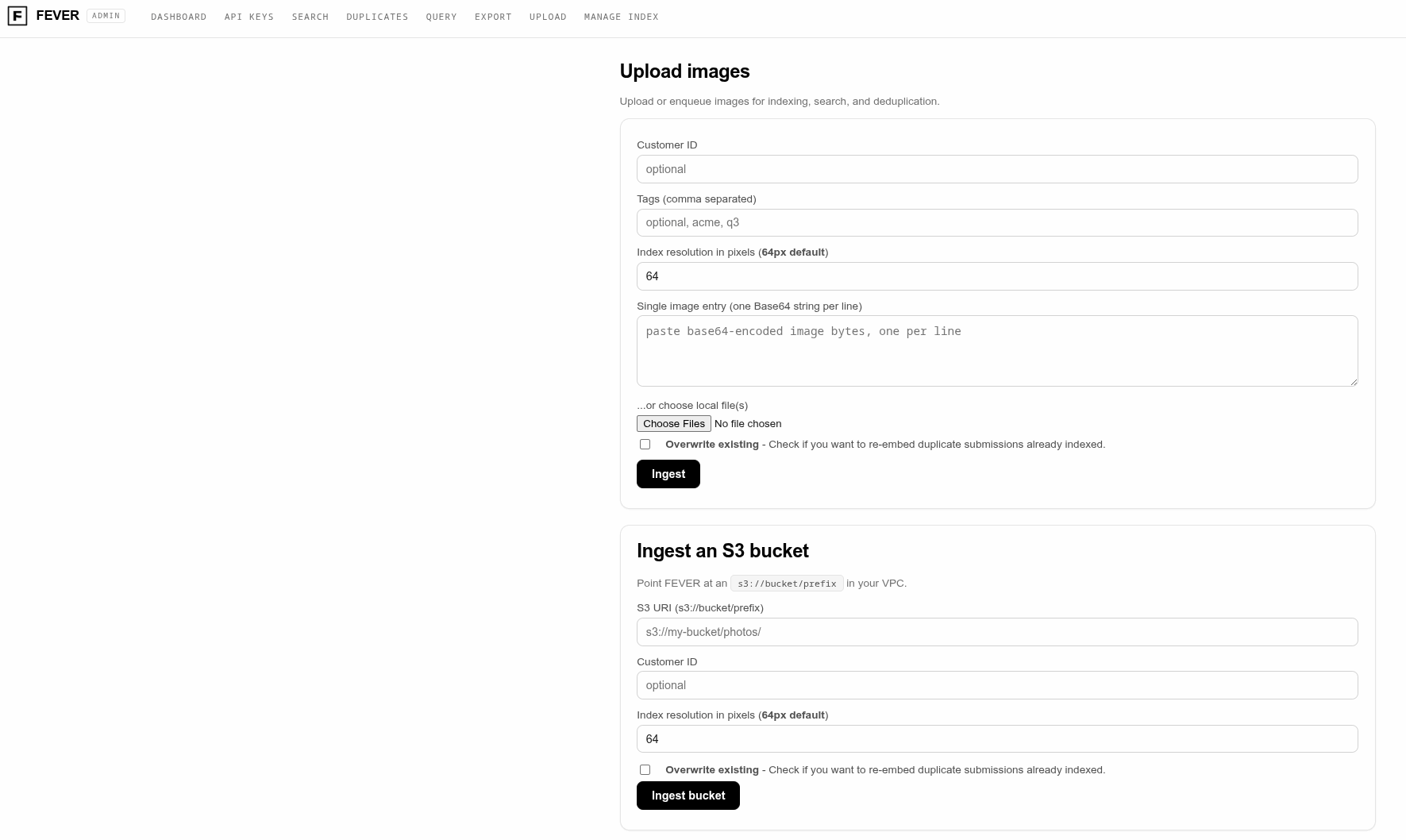
- Already have an S3 bucket of assets? The admin console crawls an
s3://bucket/prefixand ingests everything under it as one job. - Open the Upload tab, paste the S3 URI, and watch the job on the dashboard.
Recommendations
- One POST with hundreds of items beats hundreds of POSTs.
- Include any asset tags at will, if you have them, they help in curation. (Training Curation Example).
- Let FEVER normalize resolution for you; only set
target_resif you know why you need it. - If you backfill from S3 there will be no
customer_idassociation. Use the Management API in the admin console to upload a map of filename or key tocustomer_idafter the fact.
Next
- Quick Start Guide - run your first search over what you just loaded.
- Example: Find Products With Semantic Search - put the index to work.
- API Primitives - full endpoint map.